Snap a receipt. Get a spreadsheet.
receipts.page reads your receipt photos so you don't have to type them up. Check what it read, mark each one personal or business, and export a CSV for your taxes or bookkeeping.
An example
This sample receipt is made up. Here is what was read from its photo:
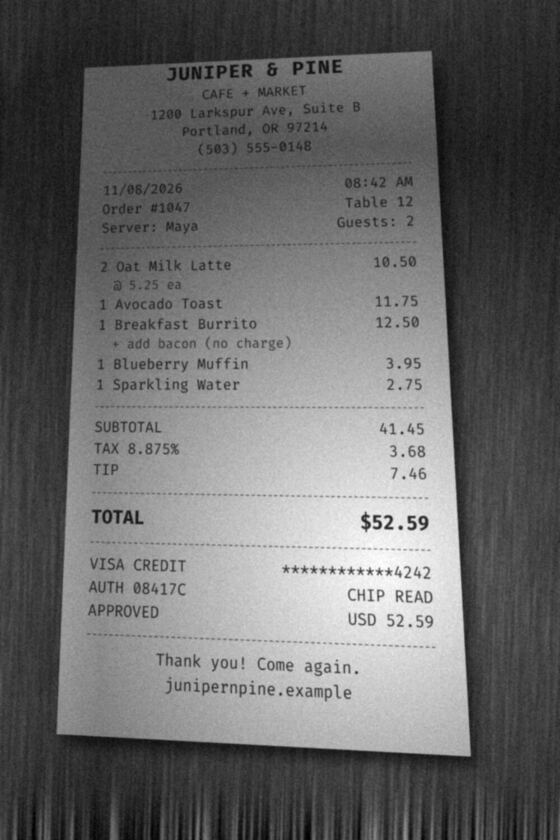
| Merchant | JUNIPER & PINE |
|---|---|
| Date | Nov 8, 2026, 08:42 |
| Subtotal | $41.45 |
| Tax | $3.68 |
| Tip | $7.46 |
| Total | $52.59 |
| Payment | Visa ending 4242 |
| Category | coffee |
| 2 × Oat Milk Latte | $10.50 |
| Avocado Toast | $11.75 |
| Breakfast Burrito | $12.50 |
| Blueberry Muffin | $3.95 |
| Sparkling Water | $2.75 |
Every field can be changed. You choose whether it's personal or business; it's personal until you say otherwise.
How it works
- Take a photo of a receipt, or choose photos from your library.
- An AI model reads it, usually within seconds. When many people are uploading at once, receipts wait in a queue.
- Check the details. A receipt is flagged for review when the merchant, date or total is missing, or the numbers don't add up.
- Search your receipts, and export a CSV of all of them, or only personal or business.
Questions
What does it cost?
Nothing during the early release: no card and no ads. Each account can add up to 50 photos a day and keep up to 2,000 receipts. Reading has a daily limit across the whole site; if it's reached, receipts wait and you can retry the next day (UTC).
What happens to my receipt photo?
Your phone shrinks the photo to at most 1800 pixels on its long edge and re-encodes it before upload, which drops its location and camera data. It's stored privately on Cloudflare under your account, with no public link, and sent to an AI model on Cloudflare Workers AI to be read. Cloudflare says it doesn't use content sent to Workers AI to train models. The photo stays until you delete the receipt or your account. More in Privacy.
Is what it reads always right?
No. AI can misread a receipt, which is why every field can be edited and why receipts that don't add up are flagged. Check the details before you rely on them.
Do I need to install an app?
No. It runs in your phone's browser, and you can add it to your home screen. You need an account with a confirmed email address.
How do I get my data out, or delete it?
Export a CSV at any time. Deleting a receipt deletes its photo; deleting your account deletes every photo, every receipt and the account. The CSV has the details, not the photos.